Blog & News
Aktuelles & Updates von
Aktuelles & Updates von
Joomla, Wordpress und Co.
News, HowTos und Tutorials rund um Webdesign, Webentwicklung, Webhosting und Digitalisierung.
Blog & News
Wordpress HTML Anker adressieren und per Klick kopieren
23.07.2025 · 2 Min Lesezeit
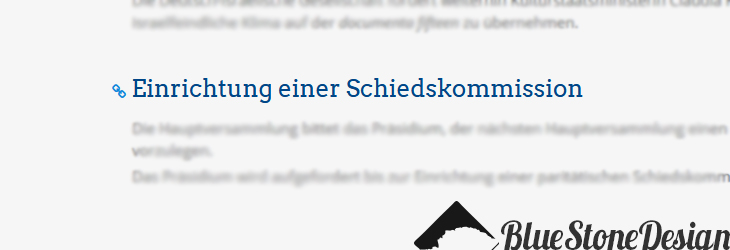
In Wordpress werden Anker sehr einfach eingebunden. Um diese überhaupt adressieren zu können muss man sich etwas einfallen lassen.
Anker in Wordpress sehen so aus:
<a id="meinanker"></a>
Das funktioniert für Nutzer die sich etwas in HTML auskennen. Unbedarfte haben dann ihre Probleme. Daher brauchen wir ersteinmal CSS um die Anker sichtbar zu machen:
a:not([href]) {
 background-color: unset;
 display: inline;
 font-size: 15px;
 margin-left: -20px;
}
a:not([href])::before {
 display: inline-block;
 text-rendering: auto;
 font-family: FontAwesome,sans-serif;
 -webkit-font-smoothing: antialiased;
 content: '\f0c1';
}
So können wir alle Elemente stylen die kein href-Attribut haben.
Damit nun per Klick auf das Icon die URL samt Anker in die Zwischenablage gelegt wird, braucht es etwas JavaSkript:
$('a').not('[href]').click(function (e) {
 e.preventDefault();
 var copyText = $(location).attr('href') + '#' + $(this).attr('id');
 document.addEventListener('copy', function(e) {
 e.clipboardData.setData('text/plain', copyText);
 e.preventDefault();
 }, true);
document.execCommand('copy');
 console.log('copied text : ', copyText);
 alert('Anker-URL: ' + copyText);
 });
Wenn die Kettensymbole nun noch verschwinden sollen und nur per HOVER sichtbar:
h1 a:not([href]),
h2 a:not([href]),
h3 a:not([href]) {
 display: none;
}
h1:hover a:not([href]),
h2:hover a:not([href]),
h3:hover a:not([href]) {
 display: inline-block;
}
Automatisches Smooth-Scrolling zum Anker beim Laden der Seite
/*** smooth scroll to anchor ***/
window.addEventListener('load', () => {
 if (window.location.hash) {
 const target = document.querySelector(window.location.hash);
 console.log( target );
 if (target) {
 target.scrollIntoView({
 behavior: 'smooth',
 });
 }
 }
});
Achtung
In neueren Browsern gibt es Probleme mit A-Ankern - es passiert einfach nichts.
<a name="anker"></a>
<a id="anker"></a>
Macht zunehmend Probleme. Was funktioniert ist das Ansprechen von DIVs und Überschriften:
<h3 id="anker">Überschrift</h3>
<div id="anker"></div>
Diese lassen sich dann áber ebenfalls Stylen wenn man noch ein class="anker" hinzufügt.
Alternative
Ein benutzerfreundliches, auf Funktionen fokussiertes Easy Table of Contents-Plugin, mit dem Sie ein Inhaltsverzeichnis in Ihre Beiträge, Seiten und benutzerdefinierten Beitragstypen einfügen können.
https://de.wordpress.org/plugins/easy-table-of-contents/
Zurück zur Übersicht